Lead capture with AI follow-up
They opt in at 11pm. Answered Leads asks what they came for, looks them up, writes to that answer and sends it from your own address — before you have even seen the notification.
Cloud-based · Nothing to install · 30-day money-back guarantee
They are going cold because nobody replied.
You paid for the traffic. You built the page. Somebody trusted you with their email address. And then it sat in a list, waiting for you to find an hour, work out who this person is, decide what to say and write something worth reading.
By the time that happens — if it happens — they have forgotten you and bought from whoever answered first.
Speed wins the reply. Relevance wins the sale. Doing both by hand, for every lead, is impossible. That is the entire reason Answered Leads exists.
Publish a hosted opt-in page, embed the form in a blog post, run it as a popup, or share the link on social and email.
Add your own question so every lead tells you what they actually came for.
The workflow fires instantly: qualified, researched, written to and emailed from your address.
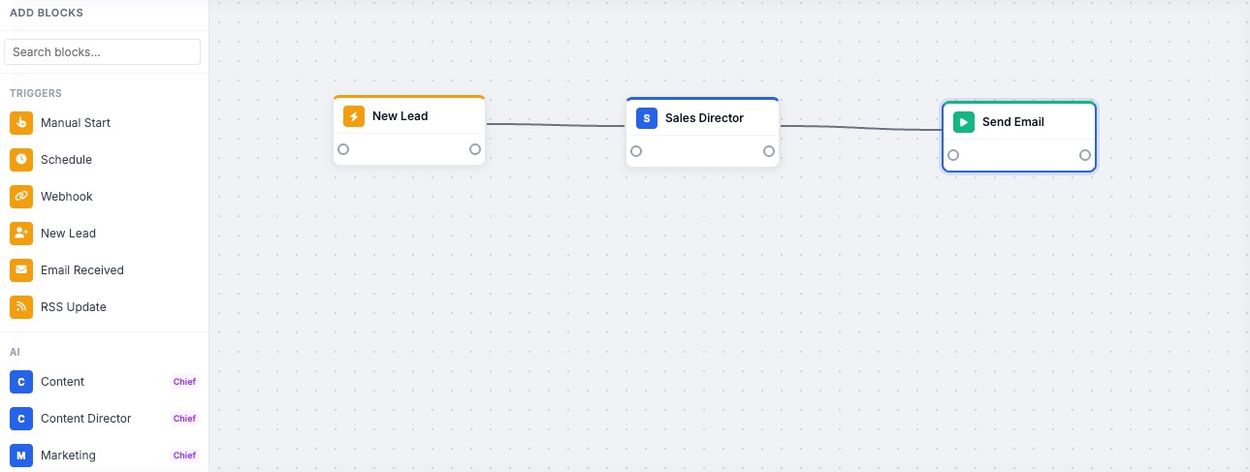
Three blocks on a canvas. That is a complete, working lead follow-up system — and you build it by dragging, not coding.
Somebody opts in. The workflow starts on its own, within seconds.
Delegates to the Qualifier, Researcher, Follow-up Writer and Nurture Agent.
The personalised reply goes out from your own address.
Most tools make you solve this yourself: build the page in one place, collect the leads in another, connect them with a third and hope the handover works. In Answered Leads capture is built in, and the form goes wherever your audience already is.
Choose a template, publish it, and the page is live on its own link. No page builder to learn, no hosting to buy.
Drop the form into a post or a page on your own site, so readers opt in at the moment they are most interested.
Run the same form as a popup and catch the visitor who was about to click away.
Put the page link in a post, a bio, a group or a DM. Anywhere you can paste a URL, you can collect leads.
Link to it from a broadcast, a signature or a swipe — and let the follow-up run itself from there.
Look at the Workflow column. Each page is pointed at the workflow it feeds, so every opt-in on the right starts the follow-up on the left.
Five routes in. One destination: your dashboard, and the workflow that fires the moment the lead arrives.
Your opt-in form does not have to stop at name and email. Add your own question, give them options to choose from, and every lead tells you what they are actually after before you write a word.
That answer is stored with the lead and handed to your agents. So the beginner gets the beginner message. The person who ticked "done for you" gets a different pitch from the one who ticked "I want to learn it myself". Same form, same workflow, a different conversation with every single lead.
Add your question and the answers you want to offer. It takes seconds, and it is the only thing you ask them to think about.
Their choice sits beside their name and email, so you can see at a glance what everyone on your list came for.
Your agents write to the answer they gave — the offer, the examples and the tone all follow their choice.
Send the answer into an IF/ELSE block and each option runs its own sequence, with its own emails and timing.
It is the difference between "thanks for signing up" and "you said you wanted X — here it is." Only one of those gets replies.
This is what runs behind that single New Lead trigger. You do not manage it, brief it or prompt it. It just happens, every time somebody opts in.
| Who | What it does | Why the lead notices |
|---|---|---|
| Sales Director | Runs the process and delegates the work | One trigger drives the whole thing |
| Lead Qualifier | Scores and classifies the lead | Serious buyers get treated differently from browsers |
| Lead Researcher | Gathers public context on the person | The email knows who they are |
| Follow-up Writer | Writes first contact around what they asked for | It reads like you wrote it for them |
| Nurture Agent | Keeps the sequence and the conversation going | They are not abandoned after one email |
The whole team on one canvas — and notice the second branch: the Nurture Agent keeps the conversation running on a delay long after the first email has landed.
Test Run reports every step: what fired, what the AI produced, where the email went. Halt-on-failure guards stop the workflow when something is missing, rather than pushing rubbish through the chain and emailing it to your list.
Five steps, all reported: scheduled, scraped, written, turned into a PDF and emailed. No guessing what the AI did.
Put this behind your next opt-in
Get started with Answered LeadsCloud-based · Nothing to install · 30-day money-back guarantee
You only need the Lead Machine to get value from day one. But every other part of your marketing has a team sitting there too — a chief agent plus its specialists, created with one click, with delegation already wired up.
Every card lists its agents, lets you pick the AI provider, and builds the whole line-up when you press Create Team.
Lead follow-up is where most people start, because it pays for itself first. The canvas does not stop there — the same drag-and-drop blocks publish content, build reports, post to social and pull in your own data.
| Blocks | What is included | What it gives you |
|---|---|---|
| 6 triggers | Manual, New Lead, Webhook, Schedule, Email Received, RSS Update | Work starts on demand or on its own |
| 7 actions | Create Content, Send Email, Social Post, WordPress, PDF, Report, Slack | AI output becomes finished work |
| 5 data blocks | Google Sheets, Airtable, Notion, Web Scrape, Custom API | Your real business data feeds the workflow |
| 4 logic blocks | IF/ELSE, Filter, Delay, Loop | Route, pause and repeat work intelligently |
| 6 AI blocks | Generate, Analyze, Research, Classify, Score, Extract | Raw information becomes decisions and assets |
Add the Loop block and a single workflow works through a whole list item by item — 25 product descriptions, 25 keywords, 25 prospects. Build it once instead of running the same prompt 25 times.
OpenAI, Claude, Gemini, Perplexity and Grok are all supported, and you pick the provider and model for each agent — cheap models for bulk work, premium models where quality decides the sale.
You connect your own AI key, so you only ever pay the provider for what you use — there are no AI credits to buy and no usage caps set by us. Your key stays in your account, you keep full control of your own billing, and you are never throttled by an allowance somebody else decided.
| If you are a | The follow-up problem you have | What changes |
|---|---|---|
| Affiliate marketer | Leads opt in for a bonus and never hear from you again | Every opt-in gets a personal reply within minutes |
| Product creator | Launch lists go cold between promotions | Nurture runs on its own between launches |
| Agency owner | Enquiries sit unanswered while you deliver client work | Enquiries get qualified and answered without you |
| Local business | Website enquiries wait until somebody checks the inbox | The reply goes out before the customer calls a competitor |
| Coach or consultant | Every prospect needs a different conversation | They tell you what they want, and the email answers it |
| Ecommerce seller | Sign-ups and abandoned carts need chasing | Both get chased automatically, in your voice |
Ready to stop writing follow-up emails?
Get started with Answered LeadsCloud-based · Nothing to install · 30-day money-back guarantee
Publish a page. Run it on real opt-ins. Read the emails it sends. If Answered Leads is not what you expected, email {{SUPPORT_EMAIL}} within 30 days and you get your money back, subject to the terms of our refund policy.
The only thing you risk is finding out how much follow-up you have been leaving on the table.
No. Workflows are built by connecting blocks on a canvas. You decide what should happen; you never write code to make it happen.
The workflow fires as soon as the lead is stored, so the email goes out once the agents have done their work — typically within minutes, at any hour, with no one watching the dashboard.
Yes. Add your own question to the opt-in form with the options you want to offer. The answer is saved with the lead and passed into the workflow, so your agents write to that choice — or you branch the workflow with an IF/ELSE block and run a different sequence for each option.
On a hosted page with its own link, embedded in a blog post or page on your own site, as a popup over your existing content, or shared as a link through social and email. Every route feeds the same dashboard and the same workflow.
Not for the built-in follow-up — emails send through your own SMTP from your own address, with unsubscribe handling included. If you already use an autoresponder you can keep it alongside.
OpenAI, Claude, Gemini, Perplexity and Grok. You choose the provider and the model for each agent.
Yes — and it works in your favour. You connect your own AI key, so you only ever pay the provider for what you use — there are no AI credits to buy and no usage caps set by us. Adding a key takes a minute: paste it into your settings and choose which provider each agent should use.
No. Your leads are never capped — you are free to build your list as fast as you can fill it.
Yes. Log in from any browser on Windows or Mac — there is nothing to install and nothing to keep updated.
Email {{SUPPORT_EMAIL}} and we will help you get it working. Most people are up and running with their first lead workflow the same day.
A 30-day money-back guarantee, subject to the terms of our refund policy. Email {{SUPPORT_EMAIL}} and it is sorted.
They either get a reply in minutes that answers the exact thing they asked for — or they get nothing, and next week they buy from whoever did answer.
You set it up once. It answers every lead, every time — including at 11pm on a Sunday.
Cloud-based · Nothing to install · 30-day money-back guarantee